
Enterprise recovery · Always-on monitoring & scheduled policy execution

The operating layer for the full Shopify inventory curve

InventoryIntel helps Shopify teams recover value from stagnant and slow-moving stock on the cold end, and protect winners before they stock out on the hot end. Continuous monitoring and scheduled policy evaluation keep recovery moving, with deterministic runway logic, guardrails and a full audit trail.

  • Always-on by design - monitoring and policy evaluation keep moving without a login
  • See runway per SKU before stock turns stagnant or discounts erode value
  • Protect winners before they stock out - flag fast-movers early with lost-revenue context
  • Set policy once and keep approval in the loop or automate, with a full audit trail
  • Connect storefront signals to the backend - badges and tags stay in step with changing conditions

InventoryIntel evaluates route fit, logistics costs and policy rules before acting, so recovery decisions stay tied to what you actually keep.
From sync to execution

A workflow buyers can see, validate and trust

This is the operating model behind InventoryIntel: sync the catalogue, analyze market context, calculate the best recovery strategy, generate the plan and then execute in guided or autonomous mode.
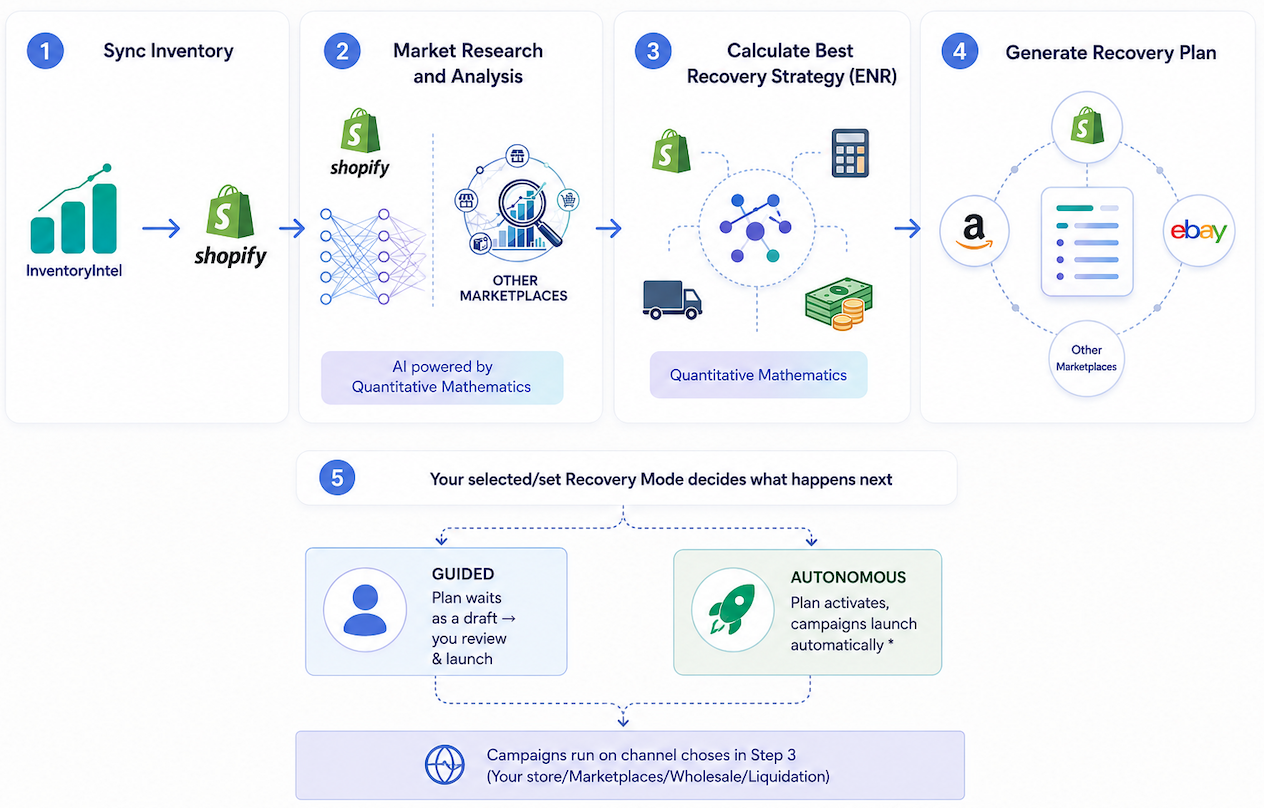
Built for enterprise buyersSync, analysis, route selection and execution are all visible in one workflow.
Corporate recovery strategy workflow diagram showing inventory sync, market research, recovery strategy calculation, plan generation, and guided or autonomous execution.
1Sync inventory
2Market research and analysis
3Calculate best recovery strategy
4Generate recovery plan
5Guided or autonomous execution
Reliability

Always on, not babysat

InventoryIntel runs continuously, checks policy on schedule, and records every action in an audit trail.

DETECT

Continuous monitoring

Catalogue, stock, velocity and pricing context are refreshed continuously, so risk is caught early.
PLAN

Scheduled policy execution

Policies are evaluated on a schedule and qualifying work is queued or launched inside your thresholds.
EXECUTE

Operator visibility

Latest-sync confidence, status changes, queued actions and recovered-revenue reporting keep teams aligned.
GOVERN

Audit trail

Every recommendation, approval, price change and rollback is recorded.
Restock Revenue Recovery

It's not just dead stock that costs you — your bestsellers do too

InventoryIntel works both ends of the curve: clear stagnant stock before it erodes margin, and flag winners before they run dry.

DETECT

“About to sell out” lane

A bestseller moving 5 a day with 12 left is empty in two days. InventoryIntel flags it early with a reorder-by date.
EXECUTE

“Just restocked” lane

A product that sold out and came back had hungry demand while it was gone. InventoryIntel re-surfaces it so you win it back.
PLAN

A dollar figure on doing nothing

Every selling SKU about to run out gets a weekly lost-revenue estimate. That turns low stock into a decision, not a guess.
GOVERN

A smart to-do list, not an autopilot

InventoryIntel shows you what to reorder and what to re-promote. It never messages your customers, holds a waitlist, or pushes to email.
Automated Product Badging

Beyond text tags: visual storefront signals that surface automatically

Text tags stay behind the scenes. Automated Product Badging goes further and pushes visual badges straight to your live storefront — Markdown, Sale, Low Stock, Sustainability and more — so the merchandised storefront shows the right signal at the right time, with no theme edits.

Close-up of the storefront markdown badge reading Save 20% today, priced to move while stock lasts

A Shopify storefront badge example: the markdown badge updates from the live recovery rule, and the same framework can power additional signals as your policies expand.

Example visual tags automatically pushed to Shopify

Markdown, Low Stock and Sustainability are the examples we are showing here. The system is broader than that, so additional badge types can be added as merchandising rules expand.

Green markdown badge with a percent symbol
MarkdownWhen a recovery markdown is live

A policy-approved price cut surfaces on the product page and collection grid — “Save 20% today, priced to move while stock lasts” — so shoppers see the deal without anyone editing the theme.

Amber low-stock alert badge with a warning triangle
Low stockWhen units drop below your threshold

Turns scarcity into conversion. The moment available stock falls under the level you set, a low-stock badge appears to nudge urgency — then clears itself once stock recovers.

Green sustainability badge with a leaf
SustainabilityWhen a product is flagged sustainable

Products you mark as sustainable automatically surface a sustainability badge, so eco credentials show on the storefront without manual merchandising.

Operator control for automated visual badges

Badges install as a Shopify theme app embed, so operators decide where they appear, how big they are, and whether the message label shows — configured once and applied across the storefront.
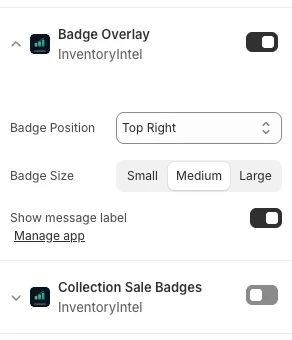
InventoryIntel badge overlay settings in the Shopify theme editor, with badge position, size and message label controls
Every badge is condition-driven: it appears only when its rule is met - an active markdown, stock under your threshold, or a sustainability flag - and clears automatically when the condition no longer holds. Markdown, Low Stock and Sustainability are the examples we show here, but the storefront signal system is designed to expand as your merchandising rules expand.
Why operators choose InventoryIntel

What justifies a premium is reliability

Anyone can discount stock. InventoryIntel earns enterprise pricing through deterministic logic, governance and breadth of recovery.

DETECT

Deterministic runway and risk logic

Runway and risk are calculated with transparent, repeatable rules, so the same inputs always produce the same status.
PLAN

Policy-driven automation with guardrails

Thresholds, price floors, exclusions and protected inventory keep automation inside boundaries you set.
GOVERN

Auditability and approval control

Review-first by default, with approval layers and a complete history of changes.
EXECUTE

Richer recovery actions than discounting

Markdowns, intelligent bundles and flash-sale campaigns move stock without relying on a blunt percentage off.
PLAN

Multi-channel recovery paths

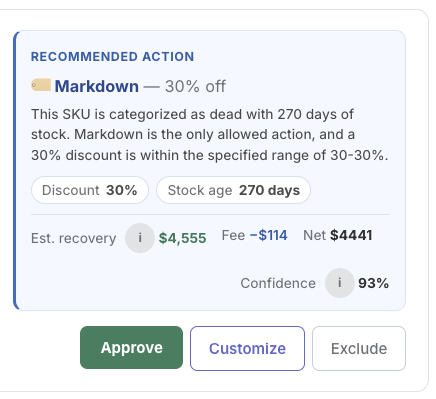
When retail isn't the strongest route, InventoryIntel compares paths and routes stock where net recovery is highest.
PLAN

Wholesale, marketplace and fallback routing

Structured wholesale sync, direct-to-wholesale export and controlled fallback routing give you off-storefront options with price-floor discipline.
EXECUTE

Storefront signals and Automated Product Badging

Backend decisions become storefront tags, collections and condition-driven visual badges.
GOVERN

Operational reliability and audit trail
Scheduled execution, latest-sync confidence and a full audit trail make recovery dependable.
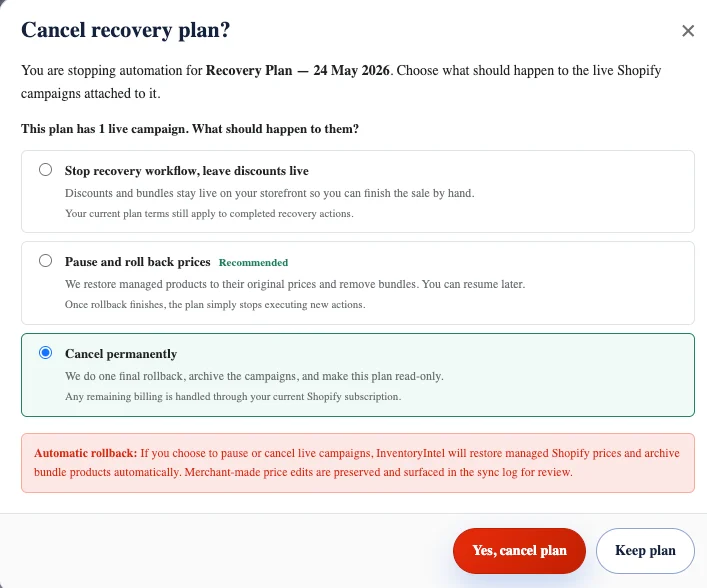
InventoryIntel cancel recovery plan dialog showing options to stop, pause and roll back, or cancel permanently, with automatic price rollback
Approval control and automatic rollback

Stop or unwind recovery cleanly — and keep the record

When you pause or cancel a recovery plan, InventoryIntel can restore managed Shopify prices and archive bundle products while keeping merchant edits in the sync log.

Policy automation

Set thresholds once. Launch campaigns automatically or keep approval in the loop.

InventoryIntel syncs, classifies, checks policy rules and then either queues work for approval or launches it automatically.

DETECT

1. Sync inventory and sales history

InventoryIntel keeps watching even when you are not logged in.
PLAN

2. Classify stock by runway and risk

Every SKU is mapped into a named status system.
GOVERN

3. Apply policies and protection rules

Set thresholds once, choose manual or automatic mode, and protect premium inventory with exclusions and price floors.
How it works

Operator teams can move from review-first workflows into policy-driven automation without losing control.

1. Sync
Refresh inventory, velocity and pricing.
2. Classify
Apply runway states and status vocabulary.
3. Apply policy
Check thresholds, exclusions and price floors.
4. Execute
Launch campaigns or routes in Shopify and connected channels.
5. Monitor
Track recovered revenue, exports and attribution.
Storefront and reporting

Backend decisions become storefront actions your customers can actually see

InventoryIntel connects policy decisions to merchandising outcomes: tags, badges, exports and attribution.

PLAN

Auto-tagging and Automated Product Badging

Text tags drive collections and reporting behind the scenes, while Automated Product Badging pushes customer-facing signals.
DETECT

Alerts, digests and monitoring

InventoryIntel keeps watching in the background with reminders, latest-sync confidence and Shopify Flow notifications where configured.
EXECUTE

See the real cash trapped in slow stock

Capital-locked shows retail value. Capital-at-cost shows the actual cash frozen in stock that isn't moving.
GOVERN

Protected inventory controls

Protect premium, seasonal or hero products with exclusions by collection, tag, product type and price threshold.
PLAN

Net-positive routing decisions

External routes are only recommended when route economics, logistics and operational costs support the strongest net recovery outcome.
DETECT

Transparent attribution

Every recovered sale is traceable to a markdown, bundle, flash sale, or route triggered by the engine.
DETECT

90-day velocity trend at a glance

A tiny inline trend line per SKU shows momentum, with flags when recent sales cross the 30-day average.
PLAN

Whole-store demand mix by channel and geography

See which channels and countries drive your demand over the last 90 days across all synced orders.
Identity and access

Enterprise access control, without adding another identity system

For teams that already use Microsoft Entra ID, Okta, or another SCIM-capable identity system, InventoryIntel can keep Shopify as the sign-in layer while enterprise access is governed in your directory. That gives security and operations teams centralized role control, cleaner offboarding, and a smaller audit burden.

GOVERN

Directory-backed roles

If your team uses a directory-backed identity system, map company groups to InventoryIntel roles so access stays aligned to your system of record.
EXECUTE

Fast offboarding

When IT removes access in the directory, InventoryIntel access follows without manual cleanup.
PLAN

Least-privilege access

Give merchandisers, operators, approvers and admins only the permissions they need.
DETECT

Audit-friendly governance

Role changes stay visible and explainable for access reviews and security checks.
Inventory status and runway

A shared inventory language your team can act on

InventoryIntel gives finance, merchandising and operations a clear status system with runway context, urgency classification and a shared language for what needs attention now.

GOVERN

Healthy

Inventory moving as expected, with enough demand and sell-through confidence to stay out of recovery workflows.
GOVERN

Slowing

Inventory beginning to slow; worth monitoring before it impacts working capital.
GOVERN

Critical

At-risk inventory that needs attention. InventoryIntel highlights what to act on next and surfaces a clear recovery direction.
GOVERN

Stagnant

Long-held inventory requiring action. Structured recovery paths help protect remaining margin before erosion worsens.
Each SKU is clearly labeled with its status and next action, so teams can move without debating what the numbers mean.
Product tour

See how the system works before you install

Evaluation-stage buyers need proof, not abstraction. InventoryIntel exposes the screens and operational surfaces that matter most before a merchant commits.

DETECT

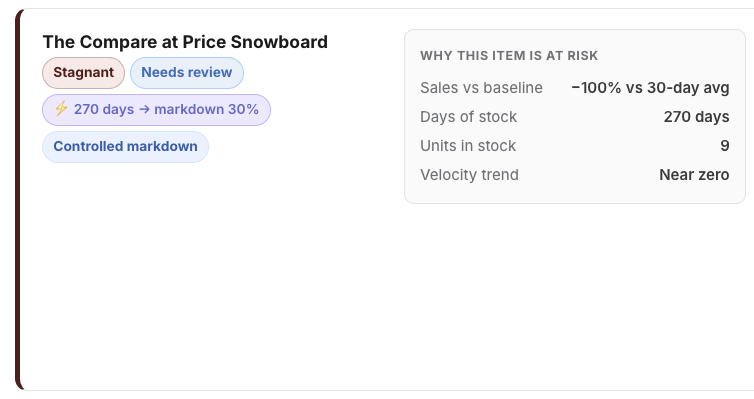
Inventory health and recovery queue

Review runway, status, urgency, route recommendation and action readiness in one operator-facing view.
GOVERN

Policies, controls and protected inventory

Show manual vs automatic modes, approval layers, thresholds, exclusions and protected inventory rules before activation.
EXECUTE

Storefront campaigns and signals

Preview how markdowns, bundles, badges and clearance merchandising appear once actions are launched.
PLAN

Reports, exports and trust

Demonstrate CSV exports, audit trail visibility, attribution and the reporting operators need to share internally.
Pricing

Inventory recovery that scales with you.

Choose a zero-upfront performance model or move into a fixed-cost partnership built for larger catalogues, tighter governance and dedicated operating support.

Most popular
Growth Plan
$0/month + 3% recovered revenue

No monthly subscription. Unlimited SKUs. Pay only when measurable recovery is created across attributed campaigns and routes. Self-serve install, billed through Shopify.

Install on Shopify
Strategic tier
Alliance Plan
Custom Shopify-billed monthly pricing

A custom fixed monthly fee with no recovery commission, for high-volume Shopify brands that prefer predictable monthly OPEX. Includes a 14-day evaluation trial and is billed through Shopify.

Request Alliance Quote

See the recovery path before the margin disappears.

Install on Shopify to see at-risk inventory, route-aware recovery plans and governance controls in one workflow. Prefer a walkthrough first? Book a demo and we will map runway, policies, routes and recovery controls against your catalogue.

Install on ShopifyBook a DemoRead the FAQ